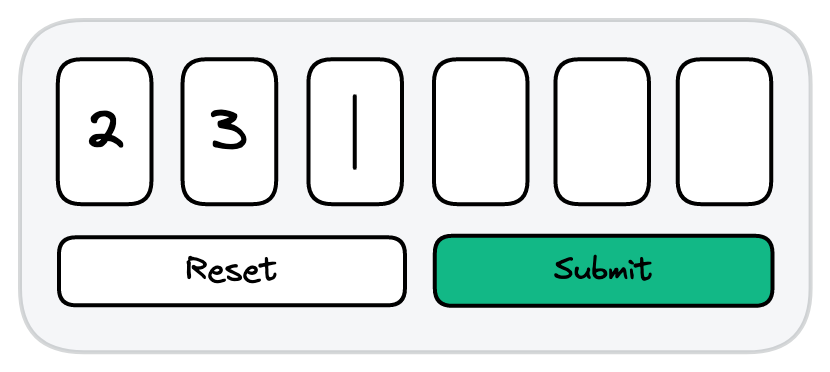
Build an auth code input component that allows users to enter a 6-digit authorization code and submit it.
Each input field should only allow one digit between 0 to 9.
Entering a valid input will move focus to the next input except when it is the last input.
Hitting will:
Backspace
Pasting should clear all fields and replace the fields with the pasted content.
POST request to https://questions.greatfrontend.com/api/questions/auth-code-input with a body of { otp: '6_DIGIT_OTP' }.
'123456' (the API is hardcoded to only accept this value).alert()).These are just the common 2FA basic behaviors, there are more edge cases to consider and we shan't list them all as it is a good practice for you to think through them on your own.
Here's a decent auth code input example.
This question is adapted from FrontendEval's Two-factor Code Input question.
The complexity of an auth code input component lies in the user experience, the custom input handling, and focus management:
<input>, the code is split across N <input> fieldsEntering values
Erasing values
Users should to be able to erase all the input fields just by using the key
Backspace
Hitting the key should erase the current value. It should also focus on the previous value if the current input field is empty
Backspace
Traversing between fields
Traversal of input fields should be possible using just the usual arrow keys and key
Tab
When users is focused on an input field, they expect to be able to type the new value – any existing values should be replaced and focus should move to the next field
There aren't too many state variables necessary as the complexity lies in focus management.
Naturally, we will need state to store the code. Strictly speaking, uncontrolled inputs can be used but keeping the input values within state will enable us to enable/disable the "Reset" and "Submit" button appropriately.
It will be necessary to have finegrain control over which input field is focused, thus a focusedIndex state value will be helpful.